
TCP vs. UDP in VPS: Choosing the Right Protocol for Your Virtual Private Server
When managing a Virtual Private Server (VPS), understanding the differences between Transmission Control Protocol (TCP) and User Datagram Protocol (UDP) is crucial for optimizing performance and ensuring reliable data transmission. Each protocol has its own strengths and weaknesses, making them suitable for different applications. This guide will help you navigate the decision-making process when configuring your VPS.
What is TCP?
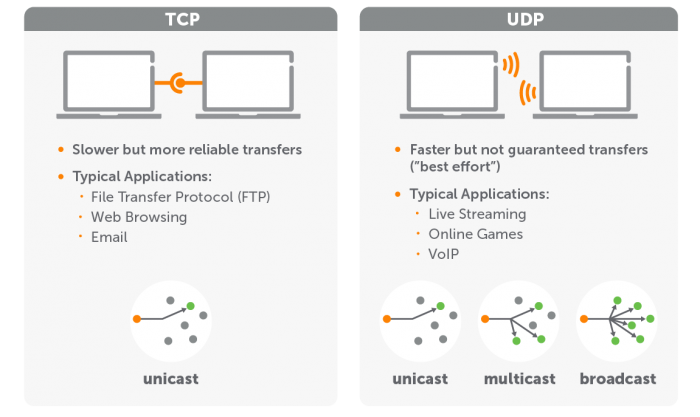
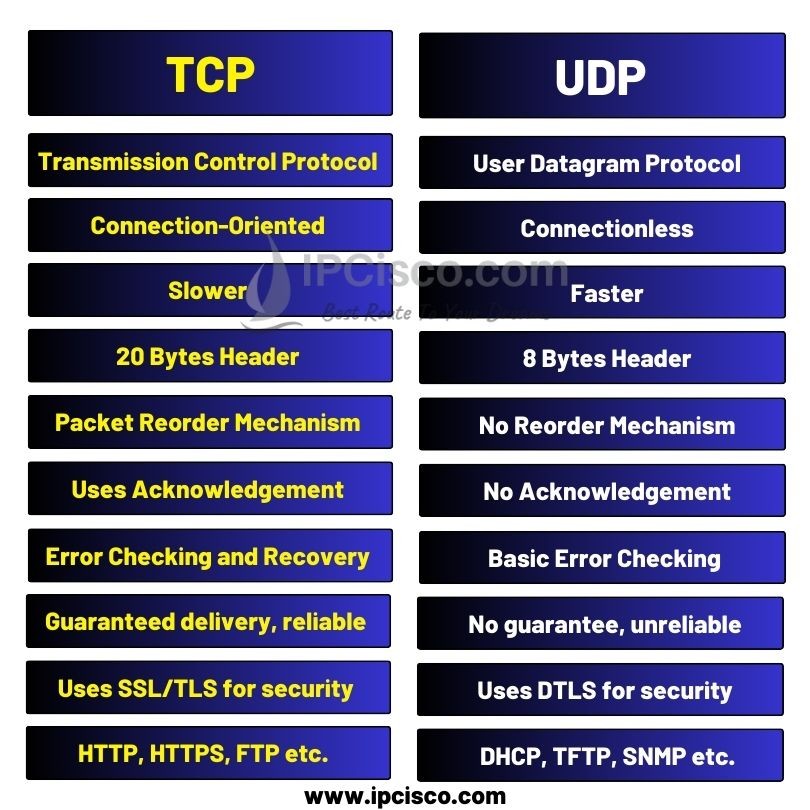
Transmission Control Protocol (TCP) is a connection-oriented protocol that ensures reliable, ordered, and error-checked delivery of data between applications. When using TCP, a connection is established before data is transmitted, making it ideal for applications where reliability is essential.
Key Features of TCP:
- Reliability: Guarantees that all data packets reach their destination without loss. Lost packets are retransmitted.
- Ordered Delivery: Ensures that data packets arrive in the same order they were sent.
- Error Checking: Includes mechanisms to detect and correct errors in data transmission.
- Flow Control: Manages data transmission rates to prevent network congestion.
Use Cases for TCP in VPS:
- Web Servers: For hosting websites where reliable data transfer is critical.
- Database Services: Ensuring accurate queries and responses between clients and databases.
- Email Servers: Reliable delivery of emails, where data integrity is paramount.
TCP vs. UDP in VPS
What is UDP?
User Datagram Protocol (UDP) is a connectionless protocol that allows data to be sent without establishing a prior connection. This makes UDP faster and more efficient, albeit at the cost of reliability and order.
Key Features of UDP:
- Speed: Minimal overhead allows for quick transmission of data, making it suitable for time-sensitive applications.
- No Connection Establishment: Data can be sent immediately without the need for a handshake.
- No Guaranteed Delivery: Packets may be lost or delivered out of order; there is no retransmission.
- Lightweight: Efficient for applications that can tolerate some data loss.
Use Cases for UDP in VPS:
- Streaming Services: For video or audio streaming where speed is prioritized and some data loss is acceptable.
- Online Gaming: Real-time interactions where low latency is crucial, and minor data loss is tolerable.
- VoIP Services: Voice communication applications that require fast data transmission.
Choosing Between TCP and UDP for Your VPS
Factors to Consider:
- Application Requirements: Determine if your application prioritizes speed or reliability. Use TCP for reliable services and UDP for speed-sensitive applications.
- Network Conditions: Assess the reliability of your network. If packet loss is common, TCP may be the better choice.
- Performance Needs: Consider the impact of latency on user experience. For real-time applications, UDP might be more appropriate.
Configuring Your VPS:
- Firewalls: Ensure that your firewall settings allow the necessary ports for both TCP and UDP traffic based on your application needs.
- Load Balancing: Implement load balancing strategies to optimize the performance of applications using TCP or UDP.
TCP vs. UDP in VPS – When choosing a protocol for a Virtual Private Server (VPS), you can consider the following factors:
- Reliability: TCP is a connection-oriented protocol that guarantees reliable data delivery. It’s the better choice for applications that require error-free and ordered data transmission, such as transferring files or using a VPN for web browsing.
- Speed: UDP is faster than TCP and is often used for real-time communication, such as online gaming, voice-over-IP (VoIP), and live streaming.
- Data integrity: TCP is the better choice when data integrity is your top priority.
- Latency: UDP is preferred for applications where low latency is more critical.
- Error checking: UDP does not perform error checking.
TCP vs. UDP in VPS Monitoring: Use monitoring tools to analyze the performance of your protocols and adjust configurations as needed.
- Reliability: TCP is a connection-oriented protocol that guarantees reliable data delivery. It’s the better choice for applications that require error-free and ordered data transmission, such as transferring files or using a VPN for web browsing.
Conclusion
Understanding the differences between TCP and UDP is essential for effectively managing your VPS. By selecting the appropriate protocol based on your application’s requirements, you can enhance performance, improve user experience, and ensure reliable data transmission. Whether you’re running a web server, a gaming server, or a streaming service, making an informed choice between TCP and UDP will set the foundation for successful operations on your VPS.